Using Semantic Indexing
Semantic indexing builds a local vector database of your binary's analysis artifacts. Once indexed, you can search for functions, strings, and symbols by describing what they do rather than what they are named — using either the concept() function in BNQL or the concept() function in the Sidekick Python API.
Important
Semantic indexing is disabled by default. If sidecar management is enabled, it requires llama.cpp (llama-server) to be installed on your system. If sidecar management is disabled, Sidekick uses the configured embedding and reranking service URLs directly. To enable semantic indexing, set sidekick.semantic_index.enabled to true in Edit > Preferences > Settings and restart Binary Ninja. When semantic indexing is disabled, concept() queries return empty results.
What semantic indexing enables
Without semantic indexing, searches are structural: you find things by name, address, or byte pattern. With semantic indexing, you can express intent in natural language:
- Find functions related to "TLS handshake" even when they are named
sub_401000. - Search for strings mentioning "credential" or "password" across the whole binary.
- Combine semantic results with structural BNQL predicates, such as "functions related to network communication that also call
send".
The index is built and maintained locally. No binary content is sent to the cloud.
How indexing works
When you open a binary, Sidekick registers a notification listener on the Binary View and begins a low-priority bootstrap enumeration in the background. The enumeration walks:
- Functions — decompiled (HLIL) source plus name, signature, size, block count, platform, calling convention, and section
- Strings — referenced strings and strings above a configurable minimum length
- Symbols — all symbol entries in the binary
Each object is rendered to text and passed to a locally running embedding sidecar. The sidecar uses a small language model to produce a vector representation, which is stored in a local SQLite-based vector database. After the initial bootstrap, the index stays current automatically: function additions, updates, and removals are reflected in near-real time via Binary Ninja notifications.
Note
Indexing runs at low priority to avoid interfering with Binary Ninja's analysis. The initial bootstrap on a large binary can take a few minutes.
Configuring the semantic index
Access the settings dialog from the Binary Ninja menu bar: Plugins > Sidekick > Configure Semantic Indexing...
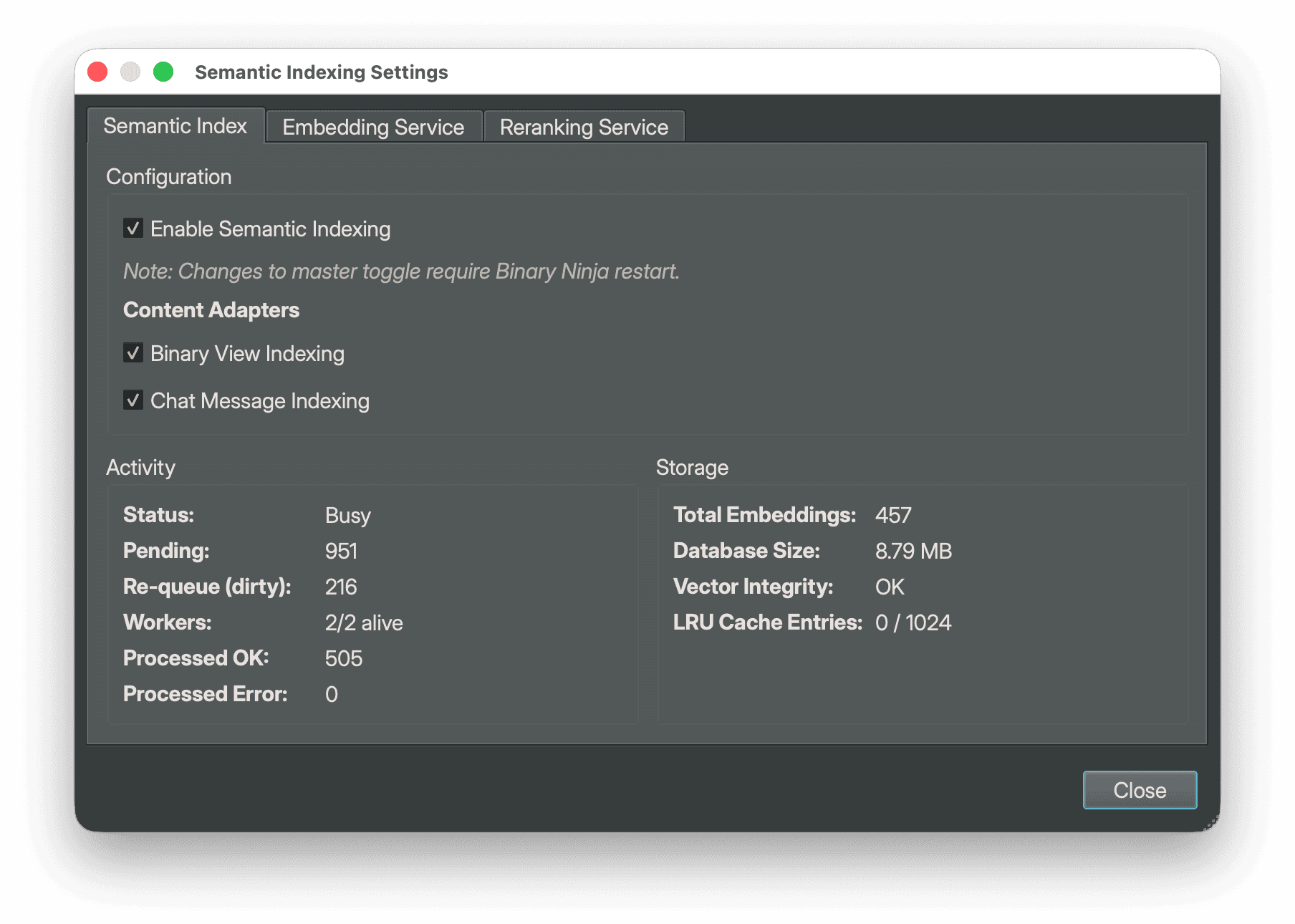
The dialog has three tabs:
Semantic Index tab
- Enable Semantic Indexing (Experimental) — Master toggle (off by default). Enabling it starts the embedding sidecar and background enumeration process. Requires
llama-serveron yourPATHonly if the embedding or reranking services use Manage Sidecar. Requires a Binary Ninja restart to take effect. - Binary View Indexing — Indexes functions, strings, and symbols from open binary views.
- Chat Message Indexing — Indexes conversation history from the Sidekick chat panel.
Both adapter checkboxes are disabled until the master toggle is on.
The Activity panel shows live processing state:
- Status —
Idlewhen nothing is queued or running;Busywhile items are queued or being processed;Pausedwhen indexing has been paused;Service Not Runningwhen semantic indexing is not enabled or started. - Pending — number of items currently waiting in the queue.
- Re-queue (dirty) — items that have been modified and are waiting to be re-indexed.
- Workers — alive worker threads over total worker threads (e.g.,
2/4 alive). - Processed OK — cumulative count of items indexed successfully.
- Processed Error — cumulative count of items that failed to index.
- Pause / Resume button — temporarily pauses background indexing without disabling it.
While items are queued or being processed, an Indexing... segment (Indexing Paused when paused) also appears in the Binary Ninja status bar next to the Sidekick indicator. Click it to see the pending, re-queue, and worker counts, to choose Pause Indexing or Resume Indexing, or to choose Open Semantic Indexing Settings....
The Storage panel shows the on-disk and in-memory state:
- Total Embeddings — number of searchable embedding vectors stored in the database.
- Database Size — size of the SQLite vector database on disk (in MB).
- Vector Integrity — reports
OKwhen embedding records and vectors are consistent; shows a mismatch description if orphaned or missing vectors are detected. - LRU Cache Entries — number of in-memory cached embeddings and the cache capacity (e.g.,
128 / 1024).
Embedding Service tab
Controls the service that computes embeddings. The default model is ggml-org/embeddinggemma-300M-GGUF (approximately 330 MB). Sidekick uses http://<host>:<port> for embedding requests. The Manage Sidecar toggle controls whether Sidekick launches and stops the local llama.cpp process for that endpoint; disable it when another process owns the configured URL, even if the host is localhost.
Note
llama-server (from the llama.cpp project) must be installed on your system only for services where Manage Sidecar is enabled. If the binary is not on your PATH, those managed sidecars will fail to start.
Reranking Service tab
Controls the reranking service, which improves result quality by re-scoring the top candidates from the initial vector search using a cross-encoder model. The default model is minhtd14/jina-reranker-v2-base-multilingual-Q8_0-GGUF. Like embeddings, Manage Sidecar controls whether Sidekick owns the local process; the host alone does not imply ownership.
Tip
Managed sidecars start automatically when Sidekick initializes with semantic indexing enabled. If a sidecar fails to start, its tab shows Status as Not Configured (or Stopped/Unhealthy if the process exited or is not responding) and semantic indexing does not start. Check the Binary Ninja log for the error, and verify that the configured host and port are available and that llama-server is on your PATH. A tab whose Manage Sidecar option is off shows Not Managed.
Adjusting string admission filters
Sidekick filters short or low-quality strings before indexing them to keep the database compact and search results relevant. You can tune the thresholds in Binary Ninja's Settings panel under the Sidekick group:
| Setting | Default | Description |
|---|---|---|
sidekick.semantic_index.adapters.binaryview.strings.filter.enabled |
true |
Enable or disable string admission filtering. |
sidekick.semantic_index.adapters.binaryview.strings.filter.min_length |
3 |
Minimum trimmed length for any string, referenced or not. |
sidekick.semantic_index.adapters.binaryview.strings.filter.unreferenced_min_length |
8 |
Minimum trimmed length for unreferenced strings. |
sidekick.semantic_index.adapters.binaryview.strings.filter.min_alpha_chars |
3 |
Minimum alphabetic character count for unreferenced strings. |
sidekick.semantic_index.adapters.binaryview.strings.filter.max_punctuation_percent |
60 |
Maximum punctuation percentage for unreferenced strings. |
When filtering is enabled, strings that are a single repeated character (four or more characters) or consist only of printf-style format specifiers (plus punctuation or whitespace) are also skipped. In addition to the thresholds, a string whose bytes fall inside a disassembled function but which nothing references is dropped automatically. Binary Ninja's string scanner runs over raw bytes before code and data are distinguished, so printable byte runs inside instructions are often flagged as strings; an in-code run with no references is almost certainly instruction bytes rather than a real string.
When filtering is disabled, none of these rules (including the in-code rule) apply. Empty strings are always skipped.
Changes to the filter settings require restarting Binary Ninja. Afterwards, use Plugins > Sidekick > Reset Semantic Index for Workspace... to re-evaluate strings that were already indexed or rejected.
Resetting a workspace index
If semantic search results look stale or you want to rebuild embeddings after changing indexing behavior, use Plugins > Sidekick > Reset Semantic Index for Workspace.... This clears stored embeddings for the current workspace, then starts reindexing open binary views and existing Sidekick chat messages.
The menu item is available only when the window has a current Sidekick workspace and semantic indexing is running. Sidekick asks for confirmation, clears the index, and then shows a summary of the binary views and chat messages queued for reindexing.
The reset affects only the current workspace. Other workspace indexes remain intact.
Searching with concept() in BNQL
The concept() function performs a semantic search against the index. You can use it as a BNQL starting point or inside a predicate.
Signature:
text_or_obj— A text description or a Binary Ninja object (function, string, etc.) to use as the query anchor.similarity— Minimum cosine similarity score, from0.0to1.0. Lower values return more results; higher values restrict to closer matches. The default0.45is a balanced starting point.limit— Maximum number of results to return. Defaults to20.
Searching by description
Run a semantic search from the Query Editor of a BNQL index in the Resources sidebar (see Indexes), from the query_database tool used by Sidekick agents, or from a script with execute_bnql.
concept() returns a concept node, not results. Traverse it with a node-type step to get the matching objects:
This returns up to 20 functions whose embeddings are semantically close to "file encryption". Use /string or /symbol to get strings or symbols instead, or /* to get all indexed object types.
Using concept() in a predicate
Filter a structural result set with a semantic condition:
This returns only functions that:
- Appear in the binary as functions (structural step), and
- Are semantically related to "TLS handshake" (semantic predicate).
The concept's similarity and limit selection is computed first, across the queried binaries. The result is then intersected with the structural step.
Combining semantic and structural queries
Returns functions related to "network communication" that also call send. The semantic candidates are found first, then filtered structurally.
Returns semantically relevant functions, excluding those whose name contains "log".
Note
concept() requires the semantic index to be enabled and running. If semantic indexing is disabled (the default), concept() returns an empty set and logs a warning to the Binary Ninja log. If it is enabled but the embedding service is not ready yet (still starting, or failed to start), the query fails with Embedding provider not ready yet. For a managed sidecar, wait for the service to show as Running in the Embedding Service tab and retry. If Manage Sidecar is off, the tab shows Not Managed; check the externally run embedding server instead.
To save concept() results for later review or to feed them into further analysis, add them to an Index.
Searching with concept() in the Python API
The sidekick.api module exposes a concept() function for use in Binary Ninja scripts.
Signature:
concept(
    target,
    subject,
    object_type=None,
    similarity=0.45,
    limit=10,
) -> list[tuple[Any, float, float]]
target— ABinaryVieworBinaryViewSetthat has an active Sidekick session.subject— A text string or a Binary Ninja object to use as the query anchor.object_type— An optional filter such as"function","string", or"symbol". PassNoneto search all indexed types.similarity— Minimum cosine similarity score (0.0—1.0). Default0.45.limit— Maximum number of results to return. Default10.
Returns a list of (object, score, similarity_score) tuples sorted by relevance. score is the final ranking score after reranking; similarity_score is the raw cosine similarity from the vector search.
Basic example
import sidekick.api as api

results = api.concept(bv, "file encryption")

for obj, score, similarity in results:
    print(f"{obj}  score={score:.3f}  similarity={similarity:.3f}")
Filtering by object type
# Return only functions
func_results = api.concept(bv, "TLS handshake", object_type="function")

for func, score, _ in func_results:
    print(f"{func.name} at {func.start:#x}  score={score:.3f}")
Using a Binary Ninja object as the query anchor
You can pass any indexed object as subject. Sidekick looks up or computes the embeddings for that object and uses them as the query vector. This lets you find objects that are semantically similar to a known one:
# Find functions similar to a known function
current_func = bv.get_function_at(0x401000)
similar = api.concept(bv, current_func, object_type="function", limit=5)
Headless scripts
Semantic indexing is disabled by default in headless sessions. Enable it explicitly:
with api.sidekick("/tmp/sidekick-headless", semantic_index=True, cleanup_app_dir=True) as sk:
    with sk.session("/tmp/sample.bndb") as sess:
        sess.wait_for_semantic_index_ready(timeout_secs=120.0)
        results = api.concept(sess.bv, "credential handling", object_type="function")
        for func, score, _ in results:
            print(func.name, score)
Set cleanup_app_dir=True when the headless app directory is only scratch state. Leave it at the default False if you want to preserve workspace and semantic-index databases across runs.
Warning
In headless mode, call sess.wait_for_semantic_index_ready(...) before relying on concept() results. The search API remains non-blocking and may return an empty list until bootstrap, debounced events, and pending semantic-index jobs have drained.
What gets indexed
| Object type | Indexed content |
|---|---|
function |
Decompiled HLIL source (addresses removed); function name, signature, size, block count, platform, calling convention, section |
string |
String value; names of referencing functions and data variables (default sub_/data_ names and absolute addresses are omitted as they carry no semantic content) |
symbol |
Symbol full, short, and raw names; type; binding; namespace; ordinal; section (absolute addresses are omitted) |
The index is scoped to the binary view. If you have multiple binaries open in a project, each binary view is indexed separately, and BNQL concept() results are limited to the binaries in the query's scope (all binaries in the analysis target, or the subset of binaries selected for the query). The Python concept() function searches the whole workspace index.
Note
Only functions, strings, and symbols are indexed. Other object kinds (basic blocks, IL instructions, data variables, types, sections, and segments) are not indexed, so concept() never returns them.
Checking index status
To verify that indexing is active and progressing:
- Open Plugins > Sidekick > Configure Semantic Indexing....
- Select the Semantic Index tab.
- The Activity panel shows the current queue depth and worker status.
When the Status field reads Idle and the Pending count is 0, the index is current.
You can also query index statistics from a script:
from sidekick.api import get_session_for_view

session = get_session_for_view(bv)
if session.semantic_index:
    stats = session.semantic_index.stats()
    print(stats)
Related pages
- BNQL Reference — Full BNQL syntax and function reference.
- Sidekick API Guide — Using
execute_bnqland theconcept()API in scripts.