Editing Binaries with Suggestions
Sidekick can automatically repair and annotate your binary around the current cursor position. Each suggestion-style operation examines the local code or data, determines what improvements to make, and applies them directly to the binary database.
There are five suggestion-style operations:
| Operation | Menu Label | What it does |
|---|---|---|
| Suggest Repairs | Suggest Repairs |
Repairs inaccurate local analysis around the current address so function boundaries, signatures, xrefs, and control flow are trustworthy |
| Suggest Types | Suggest Types |
Recovers structure definitions, applies field types, and updates function signatures and variable types |
| Suggest Imported Types | Suggest Imported Types |
Recovers likely imported function signatures from curated type libraries and call-site evidence |
| Suggest Names | Suggest Names |
Renames default-named functions, parameters, variables, and data variables with meaningful names |
| Suggest Comments | Suggest Comments |
Adds comments that clarify non-obvious code patterns, magic numbers, and complex logic |
Running a suggestion-style operation
All five operations are invoked the same way:
- Place your cursor at the address you want to analyze. This can be inside a function (code context) or on a data address (data context).
- Open
Plugins > Sidekickfrom the main menu. - Select one of:
Suggest Repairs,Suggest Types,Suggest Imported Types,Suggest Names, orSuggest Comments.
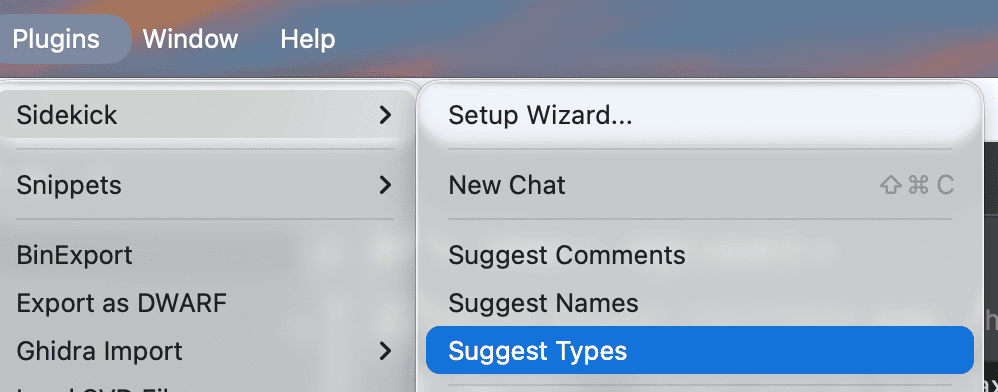
Each operation starts a new chat in the Sidekick sidebar, named after the operation and address (for example, Suggest Names @ 0x401000). The chat runs in the background with your tool permissions, and Sidekick doesn't switch to it. You can keep working in Binary Ninja. When the result is ready, the chat shows an unread dot. Open it to read the report. You can also reply to ask why a change was made or to extend the work.
Note
Suggestion-style operations apply changes directly to the binary database. You can undo any changes using Binary Ninja's undo feature (Ctrl+Z / Cmd+Z).
Suggest Repairs
Suggest Repairs is the operation to run when the decompilation output itself looks wrong. It focuses on the accuracy of Binary Ninja's local analysis around the current address — use it when function boundaries look misplaced, a function should exist but does not, imported or local signatures are clearly incorrect, cross-references are missing, or indirect control flow has not resolved correctly.
What it repairs
Depending on the local symptom set, Suggest Repairs may:
- Create or remove user functions when the current code is partitioned incorrectly
- Correct local or imported signatures, calling conventions, and stack cleanup
- Recover indirect branch targets, jump-table targets, and missing code or data references
- Repair symbols, data variables, stack variables, and other local type information
- Apply bounded analysis steering when Binary Ninja's conservative local analysis needs help
How it works
- Context: Reads the current function or data region around the target address
- Symptom detection: Identifies concrete local reasons the current analysis appears inaccurate
- Remediation: Applies bounded repairs centered on the current location
- Verification: Re-checks the affected analysis and reports whether the original symptom is resolved, or what could not be established
Tip
Run Suggest Repairs first when the decompilation itself looks wrong. Type, naming, and comment suggestions are much more reliable once the local substrate is stable.
Suggest Types
Suggest Types recovers structure definitions and applies type information around the current address. This operation is useful when you see pointer arithmetic with fixed offsets (e.g., *(arg1 + 0x10)) or void* casts that indicate underlying structure types.
Suggest Types works within the scope of the type recovery. If a necessary local analysis defect, such as an incorrect signature or stack layout, blocks a type decision, it repairs that defect within that scope; it does not run a general repair pass. Run Suggest Repairs first when the decompilation is broadly wrong.
What it analyzes
When invoked on a code address, Suggest Types examines the decompiled code to identify:
- Pointer arithmetic at fixed offsets -- these indicate structure field accesses
- Void pointer casts and raw integer-to-pointer conversions -- these indicate typed pointers
- Allocation sites (
malloc,calloc,reallocreturn values) -- these indicate structure allocations - Library function parameter types -- these constrain buffer sizes and field types
When invoked on a data address, Suggest Types examines the data listing to identify:
- Pointer chains (consecutive pointer-sized values) -- these indicate vtables (recovered as class and vtable structures, with inheritance where established) or ordinary function pointer tables
- Repeated structures (regular byte patterns at fixed intervals) -- these indicate arrays of structures
- Scalar arrays (consecutive uniform-size values) -- these indicate offset tables or index arrays
What it changes
Suggest Types may apply the following modifications to the binary database:
- Define new structure types with named fields
- Define enumeration types when fields take on small sets of integer values
- Update function signatures with recovered parameter and return types
- Set variable types to recovered structure pointers
- Recover class layouts and inheritance (base classes and vtable relationships)
- Define class and vtable structures and type the vtable data variables
- Type data variables as arrays, structures, or function pointer tables
How it works
The operation follows a multi-phase workflow:
- Context: Queries the function or data region around the target address
- Analysis: Identifies type-recovery patterns and groups related accesses by base pointer into candidate structures
- Expansion: Examines callees, callers, or data variables that share candidate structures to complete the type definitions
- Definition: Defines structure types, enumerations, and unions with correctly sized fields
- Application: Applies the type changes in one or more batches (transactions)
- Verification: Checks the applied types against how they are used in the code, not just how the decompiled output looks, and corrects contradictions
Tip
Run Suggest Types before running Suggest Names. Recovered structure types provide important context that helps Suggest Names produce higher-quality names.
Suggest Imported Types
Suggest Imported Types recovers signatures for imported symbols whose types are missing or too generic because the right type library is not loaded. This operation is useful when library calls appear as unresolved imports, void*-heavy calls, or calls with unknown argument and return types.
What it analyzes
Suggest Imported Types examines the imported symbol near the current address, the binary format's import metadata, available library names, curated type information, and local call-site usage.
What it changes
Suggest Imported Types may:
- Apply a function signature to an imported symbol at its GOT or IAT slot
- Use call-site evidence to choose between candidate overloads or library variants
- Record uncertain attributions conservatively when the binary format does not name the source library
How it works
- Context: Resolves the imported symbol and nearby call sites
- Candidate recovery: Looks for known signatures in curated type data and service-side import knowledge
- Validation: Checks whether the candidate signature matches local argument and return-value usage
- Application: Applies high-confidence signatures in a transaction that can be reviewed in the Transaction Log
Suggest Names
Suggest Names gives meaningful names to default-named functions, variables, and data variables around the current address. This operation is useful when you see identifiers like sub_401000, var_8, or data_404000 that obscure the purpose of the code.
Suggest Names changes names only. It does not repair analysis or add comments. If broken analysis prevents a defensible name, it leaves that target unchanged and reports the problem; run Suggest Repairs first in that case.
What it targets
Suggest Names only renames items that currently have default names:
- Functions with names like
sub_XXXX - Local variables with names like
var_XXorvar_XX_1 - Data variables (globals) with names like
data_XXXX - Parameters with names like
arg1 - Register-named temporaries (such as
raxorx0) whose purpose is clear
Items that already have meaningful, user-assigned names are left unchanged.
Scope: the function containing the cursor, its default-named callees, and the data variables it references. On a data address outside a function, Suggest Names works on data variables in the surrounding data window.
Naming conventions
Suggest Names follows these conventions:
| Item type | Convention | Examples |
|---|---|---|
| Functions | snake_case verb phrases |
parse_header, init_connection, validate_input |
| Local variables | snake_case noun phrases |
buffer_size, config_ptr, loop_counter |
| Data variables | g_ prefix with snake_case |
g_config, g_connection_count, g_vtable |
What it analyzes
When invoked on a code address, Suggest Names examines the decompiled code and derives names from:
- The operations a function performs and the library functions it calls
- How variables are used -- assignments, function call arguments, comparisons, return values
- Strings referenced in the code
- The calling context (who calls this function and why)
When invoked on a data address, Suggest Names examines data variable types, values, pointer targets, and cross-references to determine appropriate names.
How it works
The operation follows a multi-phase workflow:
- Context: Queries the function or data region around the target address
- Identification: Finds default-named identifiers in scope, including default-named callees and referenced data variables
- Application: Applies names in one or more batches (transactions), leaving uncertain items unchanged
- Verification: Reads back the renamed code and corrects misleading names
Tip
Run Suggest Names on a function after its callees have already been named. Sidekick produces better names for variables and the function itself when the surrounding context uses meaningful identifiers.
Suggest Comments
Suggest Comments adds targeted comments that clarify non-obvious code patterns around the current address. Unlike the other suggestion types, this operation is intentionally selective -- it comments only the parts of the code that would confuse a reader without additional context.
Suggest Comments only adds comments. It does not rename items or repair analysis, and it skips targets that depend on broken analysis. Run Suggest Repairs first if the decompilation looks wrong.
What it comments
When invoked on a code address, Suggest Comments looks for:
- Magic numbers and bitmasks -- constant values whose meaning is not self-evident (e.g.,
flags & 0x80,status == 3) - Non-obvious control flow -- error-handling patterns, fallthrough logic, early returns with specific conditions
- Opaque library calls -- calls where the purpose is not clear from the function name and arguments alone
- Complex pointer arithmetic or casts -- operations that would confuse a reader without context
- Security-relevant code -- bounds checks, authentication gates, cryptographic operations, permission checks
- Algorithm implementations -- loops or sequences that implement a recognizable algorithm (hashing, sorting, encoding)
- Function-level summaries -- when the function's purpose is not obvious from its name
When invoked on a data address, Suggest Comments adds comments that describe:
- The purpose of data variables based on their type, value, and cross-references
- The structure of data regions (e.g., "vtable for class X", "dispatch table for handler lookup")
- The meaning of specific constant values stored in data
Comment quality
Suggest Comments follows these principles:
- Explain "why", not "what" -- comments do not restate the code in English
- Be concise -- one line when possible, two at most
- Be selective -- obvious code is left uncommented; over-commenting is avoided
- Stay local -- when examining a callee to understand a call site, the comment goes on the call site in the original function, not on the callee itself
How it works
The operation follows a multi-phase workflow:
- Context: Queries the function or data region around the target address
- Pattern identification: Reads through the code and identifies non-obvious patterns that warrant comments. Related code is read only as evidence
- Application: Applies comments in one or more batches (transactions)
- Verification: Reads each comment back and removes or corrects comments that do not add information
Reviewing applied changes
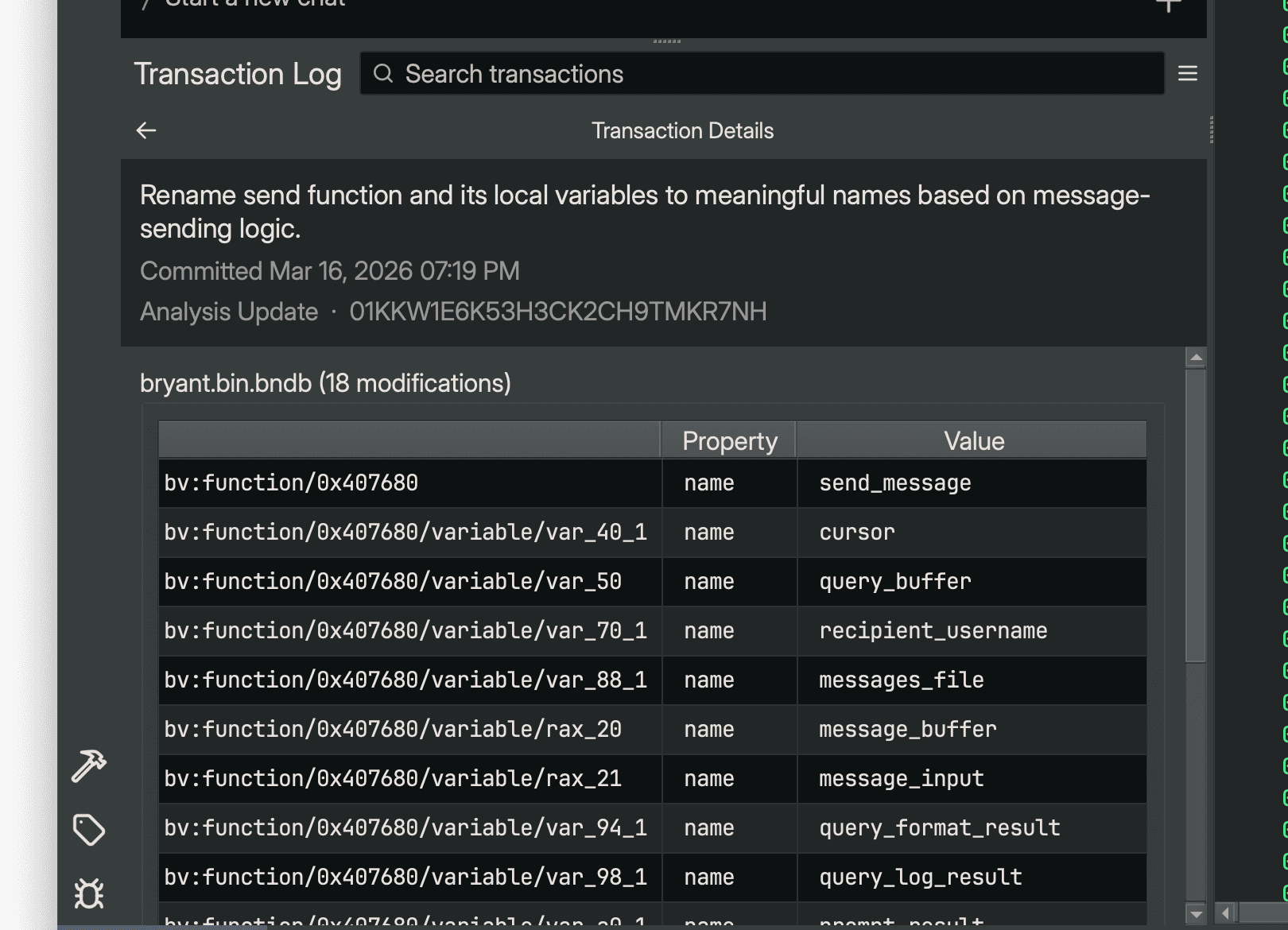
All modifications made by suggestion-style operations are recorded in the Sidekick Transaction Log sidebar. Each operation creates one or more transactions that you can review after the operation completes.
To view the Transaction Log:
- Open the Sidekick Transaction Log sidebar from the right sidebar panel in Binary Ninja.
- Select a transaction to view its details, including the target URIs and each modified property's before and after values.
- Double-click a modification’s URI header (including the sticky header) to navigate to its address in the binary.
Undoing suggestions
If an operation produces results you do not want, use Binary Ninja's undo feature (Ctrl+Z / Cmd+Z) to revert the changes. Each transaction an operation applies is grouped as a single undo action. An operation may apply several transactions, so you may need to undo more than once; check the Transaction Log to see how many transactions the operation created.
Tips for effective use
-
Start with substrate repair if the decompilation is wrong. Run
Suggest Repairsfirst when boundaries, signatures, xrefs, or indirect control flow look incorrect. -
Then types, then imported types where needed, then names, then comments. Structure recovery and imported function signatures provide context that improves naming quality, and meaningful names improve comment quality.
-
Run suggestions on well-connected functions. Functions that call many other functions or are called from many places provide more context for Sidekick to work with.
-
Use Suggest Names after naming callees. Sidekick produces better names for a function's variables when the functions it calls already have meaningful names.
-
Combine with Chat. If an operation does not produce the result you want, use the Chat sidebar to ask Sidekick for a more targeted analysis or to explain what a specific function does.
-
Review the Transaction Log. After running an operation, check the Transaction Log to see exactly what was changed and navigate to the affected locations.