Setting a Workspace Budget
A workspace budget is an optional, one-time spending limit. Set it in credits, or, when your plan has a monthly allowance, as a percentage of it: for example, allocate 10% of a monthly allowance to an investigation. Sidekick converts a percentage into a fixed number of credits and shows the result before you save.
Open Workspace Budget… from the workspace's chat menu, or, in the Sidekick tab's Monitor view, click the workspace's Spent / budget figure and choose Set Budget…. The workspace must be open to change its budget. The figure's card shows recorded spending, the budget, and what remains.
The dialog shows what the workspace has spent against its budget. Choose Limit to and enter the workspace's total limit in credits or % of monthly allowance, or choose No limit. To top up, raise the total. Spending already recorded in the workspace counts toward the limit, even if it happened before you configured a budget. No limit removes only the workspace limit; your account's limits still apply.
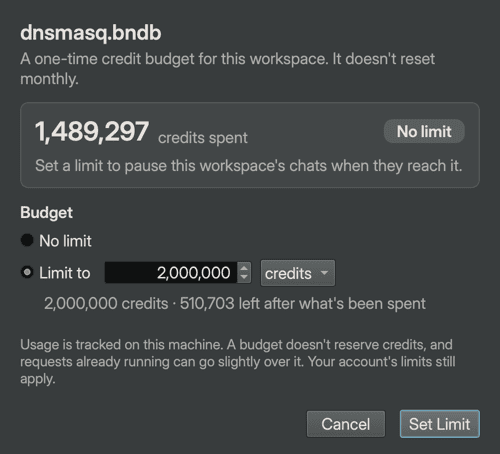
Budgets do not reserve credits. You can allocate 100% to each of three workspaces. Each may spend up to its independent limit, subject to the credits actually available on your account. A workspace with no budget has no workspace-specific spending limit.
Monthly percentages, one-time limits
A budget does not reset when your monthly plan renews. Changing plans also leaves existing budgets unchanged. A budget set as a percentage remembers the monthly allowance it was based on, and the ledger shows its spending as percentages of that allowance, not of the workspace budget. Budgets set in credits show credits.
For example, with a monthly allowance of 1,000 credits, a 10% budget allows 100 credits. After spending 60 credits, the ledger reads 6% / 10%. The workspace has spent 60% of its own budget and has 40 credits remaining.
If your plan has no fixed monthly allowance, or the service hasn't reported it yet, budgets are set in credits only.
Reaching the limit
Sidekick pauses new billable requests when recorded spending reaches the limit. Raise the limit and click Set Limit and Resume, or choose No limit and click Remove Limit and Resume, to restart the paused chats. If the budget was already raised elsewhere, the dialog offers Resume instead. Resuming never approves pending tools.
The budget covers workspace-attributed Sidekick service requests, including child agents, background work, summaries, and title generation. Requests using your own provider keys are outside the Sidekick credit budget.
Requests already in flight can take spending over the limit. Consumption is tracked from received service responses, so lost responses can undercount usage. If the service omits usage metadata, a limited workspace pauses before further billable work; restore the connection to an updated server and click Check Again in the dialog, or remove the workspace limit.
Usage and budgets persist when you reopen a workspace. Save As copies the current usage and remaining allowance; subsequent spending in the two copies is independent. Workspaces created before this feature start with zero recorded usage; historical spending is not reconstructed.
Python API
Use these host-side controls on a SessionContext:
sess.set_budget_percentage(10, monthly_allowance=1000)
sess.add_budget_percentage(5, monthly_allowance=1000)
print(sess.budget_usage.consumed, sess.budget_usage.remaining)
sess.resume_budget()
The caller supplies the monthly allowance explicitly. set_budget(credits) and add_budget(credits) work in exact credit units. set_budget(None) removes the limit. These are host-side controls, not agent tools.